

Earlier this week, I outlined some of the first steps I’ve taken in response to all of the information I heard at a Comprehensive Wellness conference I attended in October. One of the main ones has been to change from sitting in front of a computer most of every day to standing in front of a computer most of every day. If you’re interested in some of the research on the relative hazards of sitting – and standing – I suggest reading this article on the Time Health and Family website, which makes a strong case for striking a balance between sitting and standing.
When I returned home after the conference, one of the first things I did was come up with a makeshift standing desk…


I’m really glad I took this step, because initially I found my legs and back got tired after standing for about an hour, and I’d remove the crate and stack of books and sit down for a while. The biggest flaw with the makeshift set-up was that my monitor was too low – I should have found a way to elevate the computer screen beyond moving it to the top of its adjustable stand.
Mr. GeoK tried hard to ignore my non-aesthetic standing desk solution, but after just a couple of weeks he started researching more elegant solutions for converting a sitting desk to a standing desk. After checking online reviews, watching some videos on standing desk options and consulting user comments and forum posts, he contacted Ergo Desktop and purchased two Kangaroo Pro Junior adjustable height desktop units – one for me and one for him.
To minimize shipping costs, our Kangaroo Pro Juniors arrived in flat pack boxes, which meant we had some minor assembly to do. The instructions were straightforward and the only tools we had to provide were two 7/16 wrenches. Assembly was a two-person job – especially when it came to mounting the monitor on the VESA bracket. Also, Mr. GeoK cut some thin wooden shims which he slipped between the back of each monitor and the front flat panel of the VESA brackets, to keep the metal from buckling a little in order to accommodate our Dell monitors. Going without shims would have worked just fine, but not quite fine enough for Mr. GeoK’s liking. The assembled unit is large enough and heavy enough that we teamed up to position the units on our desks. Here’s mine, in place…

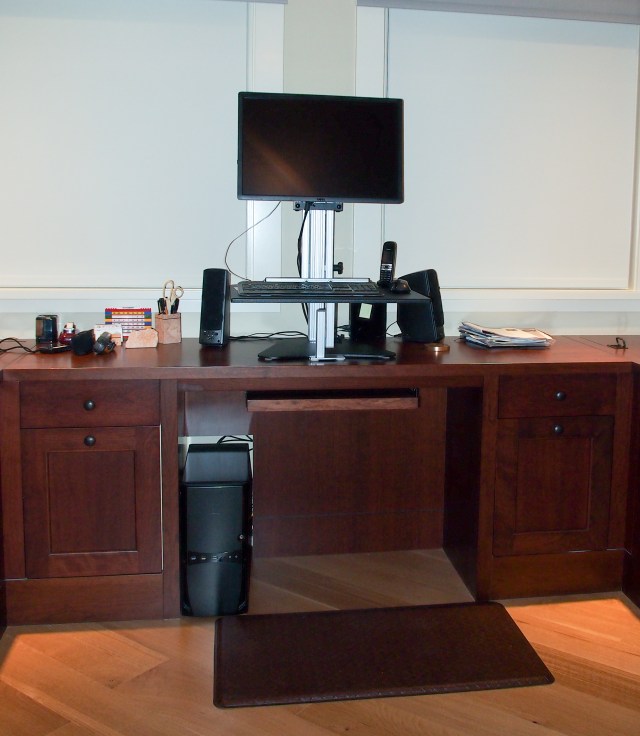
We’ve been working at our Kangaroo Pro Junior standing desks for several weeks now. Here are our current thoughts in terms of likes / dislikes:
- One of the best features about the Kangaroo Pro Junior is that the monitor and work surface / keyboard shelf have separate adjustments. So people of different heights and arm / torso lengths can fine-tune the keyboard and monitor height until they’re just right.
- The Kangaroo Pro Junior’s ability to serve as a standing desk and revert to a sitting desk is very attractive. I generally don’t lower the keyboard / monitor to sitting position because I have a gel floor mat to stand on and it has to be moved out-of-the-way before I can roll a desk chair into place. So for me, it’s only worthwhile to adjust the unit to sitting desk height if I have a lot of writing to do or am analyzing something where I have to refer to bulky printed materials for an extended period of time.
- At 60 cm x 45 cm (24 in x 18 in), the work surface comfortably accommodates a full-sized keyboard (with number pad, separate arrow keys, etc.) and mouse (although there’s no room for a full-sized mouse pad – which isn’t really a problem because the surface of the work surface registers my mouse movements without any problems (a gamer may disagree)).
- If I have writing to do by hand, it’s easy to move my wireless keyboard off the work surface and continue to work standing up. This is especially helpful if I’m trying to multi-task (i.e. watch a webinar while jotting down the next day’s grocery shopping list).
- I’m still trying to decide whether I’m standing just a little too close to my monitor. My eyes are about 50 cm (20 in) from the monitor and I prefer to be about 60 cm (24 in) from the monitor. NOTE: I have a 60 cm (24 in) diagonal monitor. If I eventually decide I’m too close (or someday get a larger monitor), there’s any easy fix available from Ergo Desktop – the 20 cm (8 in) keyboard extension, which clips onto the leading edge of the work surface, no tools required. This is entirely a matter of personal preference; Mr. GeoK also has a 60 cm (24 in) diagonal monitor and he finds the eye-to-monitor distance very comfortable.
The Kangaroo Pro Junior is not meant to be used with laptops. At it’s not suitable for monitors without a VESA mount. But Ergo Desktop has a wide range of standing desk solutions, including the ability to handle two monitors and a wide range of work surface sizes/shapes/colours.
If you’re interested in some of the other options out there for converting a sitting desk to a standing desk, free-standing standing desks, and more studies on why it’s important to try to balance time spent sitting with time spent standing, you’ll want to read this extensive article, researched and written by Mark Lukach and published on thewirecutter.com in May 2012.
If you prefer not to spend money on a standing desk for your computer, there are other ways to incorporate standing time into an office job. Consider standing when you’re on the phone, when you’re reading any printed materials, or programming your calendar to remind you to take a 5 minute walk around the office every couple of hours. Maybe you can stand up at staff meetings. Perhaps it’s possible to take some one-on-one meetings outside, and go for a “walk and talk” instead of meeting at a table.
Have you come up with other ways to strike a reasonable balance between sitting and standing time during your work day? If so, please share by leaving a comment.